.png)
|
Copy inventories |
|
|
Clicking this button invokes the functionality to copy an Equipment and/or Accessory Inventory from another well. This is particularly useful on batch drilling operations, where equipment may have to be transferred from one well to the next. This can be for administrative purposes, but also the re-use the tool data for selection in new BHA's. |
.png)
When the function is invoked, the following dialog box will appear.
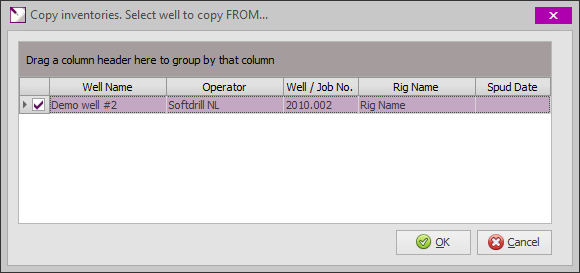
Select the well to copy the inventory from and click [OK] to proceed. The following dialog box will appear to determine how the inventory should be copied.
.png)
|
Copy equipment inventory |
|
|
Select this option to copy the equipment inventory (drilling tools) from the selected well to the current well. |
|
|
|
|
.png)
.png)
|
Copy accessory inventory |
|
|
Select this option to copy the accessory inventory (stabilizer sleeves, MWD transmitters, etc.) from the selected well to the current well. |
|
|
|
|
.png)
.png)
|
Delete unused items |
|
|
Copy items in "overwrite" mode. This mode is to replace the current inventory, which is achieved by deleting the current items before copying the new items. However, this is not a full overwrite; only tools not used in one or more BHA's will be deleted before copying the new items. Items in the inventory for the current well that are already used in one or more BHA's will not be deleted. |
|
|
|
|
.png)
.png)
|
Append copied items |
|
|
This mode will append the copied items to the existing inventory items for the current well. |
|
|
|
|
.png)
.png)
|
Leave ON LOCATION DATE blank Option |
|
|
This selection determines what happens with the On Location field for the copied items. The field may be left blank, but normally this would be set to the date the items were transferred from one well to the next.
|
|
|
|
|
.png)

.png)
|
Copyright © 2023 Softdrill NL |